Google Search Console Coverage Report Errors Explained
7,950 organic clicks/mo, 557,000 impressions/mo, and 16,100 indexed pages still leave 591,000 URLs not indexed. The GSC coverage report is where you see why.
What the report shows
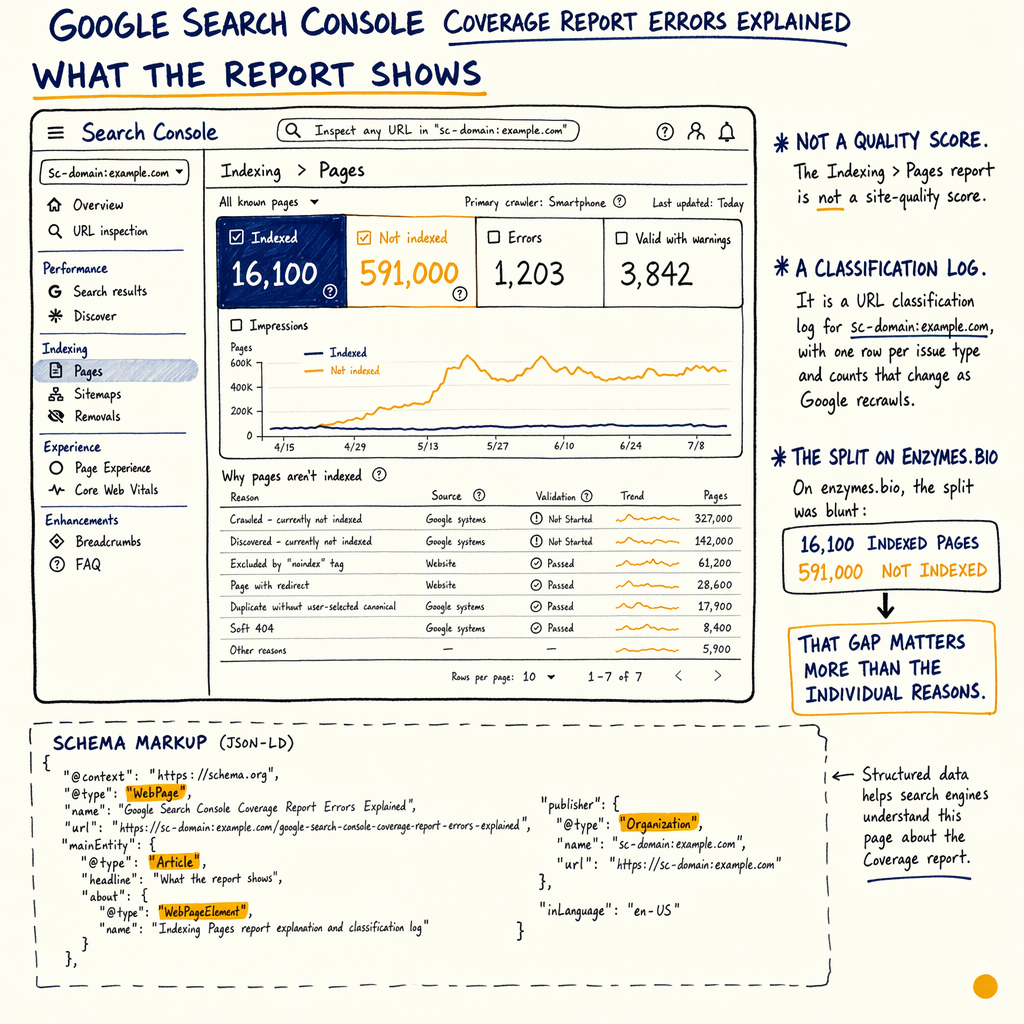
The Indexing › Pages report is not a site-quality score. It is a URL classification log for sc-domain:example.com, with one row per issue type and counts that change as Google recrawls.
On enzymes.bio, the split was blunt: 16,100 indexed pages and 591,000 not indexed. That gap matters more than the label on the issue. If Google cannot explain a URL with a stable status, it usually cannot rank it consistently.
Use the report with Performance › Search results open beside it. Compare Total clicks, Total impressions, and Average position over the Last 16 months so you can tell whether a fix improved discovery, not just indexation.
How to read it
Start in Indexing › Pages, then click any issue row to see the Examples table. The important columns are the issue label, validation state, and sample URLs. Google is telling you which URLs it chose, not every bad URL on the site.
A page indexing report error only matters if it affects URLs that should rank or convert. A thin tag archive with 50,000 URLs is noise. A product page, category page, or guide that should be indexed is signal.
Cross-check with Indexing › Sitemaps. If a URL is in the sitemap but still sits in Discovered - currently not indexed or Crawled - currently not indexed, the sitemap is not the problem. The page or its internal signals are.
The 14 error types
Server error (5xx)
Google got a 500/502/503 while crawling. Check origin uptime, edge caching, and Settings › Crawl stats for spikes in failed requests.
Redirect error
The URL chain breaks, loops, or hits too many hops. Keep redirects to one step where possible and verify final status is 200.
Submitted URL blocked by robots.txt
Your sitemap includes a URL Google cannot fetch. Either remove the block or remove the URL from the sitemap.
Submitted URL marked noindex
The page is in the sitemap but sends noindex. Pick one signal: index it, or keep it out of the sitemap.
Submitted URL seems to be a Soft 404
Google thinks the page is empty, generic, or functionally gone. Add unique content or return a real 404/410.
Submitted URL not found (404)
The sitemap points at a dead URL. Fix the internal link, redirect to the best match, or drop the URL.
Submitted URL has crawl issue
Google could not fetch the page for an unspecified reason. Check response headers, TLS, and robots delivery.
Blocked by robots.txt
The URL was found but cannot be crawled. This often shows up as a deliberate block that later gets forgotten.
Excluded by `noindex` tag
The page can be crawled, but the HTML says not to index it. Common on filtered pages and staging leftovers.
Alternate page with proper canonical tag
Google picked a different canonical. If the chosen page is wrong, fix internal links, canonicals, and duplicates.
Duplicate without user-selected canonical
Google found duplicate URLs and had to guess. Add a canonical and reduce parameter-based duplication.
Discovered - currently not indexed
Google knows the URL but has not crawled it yet. This is often a crawl-budget or internal-linking problem.
Crawled - currently not indexed
Google fetched the page and decided not to index it. Usually thin content, duplicate intent, or weak signals.
Page with redirect
The URL resolves via redirect and is therefore excluded. This is normal unless the redirect target is wrong or temporary.
Warnings and exclusions
The coverage report explained version most people want is really about the gray rows: warnings and exclusions. They are not all bugs.
Discovered - currently not indexed usually means Google saw the URL in a sitemap or link graph but did not spend crawl budget on it yet. Crawled - currently not indexed means Google spent the crawl and still did not see enough value.
On enzymes.bio, a big contributor was scale: 35 languages via TranslatePress and a huge multilingual URL surface. If the page set is larger than the link graph can support, you get a backlog. That is not a mystery; it is capacity.
Fix order that works
- 01
Sort by business value
Start with URLs that can earn clicks or revenue. Ignore archive noise until the money pages are clean.
- 02
Check the URL source
For each row, ask where Google found it: sitemap, internal link, external link, or legacy redirect. Then fix the source, not just the symptom.
- 03
Inspect response and canonicals
Use DevTools and
curl -Ito verify status code, canonical, robots meta, and redirect target. A mismatch here explains many gsc coverage report errors. - 04
Rebuild internal paths
If important pages sit in
Discovered - currently not indexed, improve internal links from indexable hubs and related pages. - 05
Validate with GSC
After fixes, click Validate fix in
Indexing › Pagesand watch both the issue count andPerformance › Search resultstrend.
Checks in GSC
curl -I https://example.com/product/widget

# Look for:
# HTTP/2 200
# x-robots-tag: none
# link: <https://example.com/product/widget>; rel="canonical"

# If you test a redirect chain, verify the final URL only:
curl -I -L https://example.com/old-widget

# In Search Console, compare:
# Indexing › Pages
# Indexing › Sitemaps
# Performance › Search results
# Settings › Crawl stats
Common traps
| Field | Bad read | Better read |
|---|---|---|
Discovered - currently not indexed | Google hates the page | Google has not crawled it yet |
Crawled - currently not indexed | The page is broken | The page was crawled and judged low value |
Alternate page with proper canonical tag | Duplicate content penalty | Canonical selection is working, unless it picked the wrong URL |
Submitted URL blocked by robots.txt | Robots is always wrong | The sitemap and crawl rules conflict |
Page with redirect | A fatal error | Expected exclusion if the redirect target is correct |
Why links still matter
A lot of gsc errors list articles stop at the error label. That misses the reason the label exists. Google is compressing crawl, duplication, and quality signals into a status.
If your site has no external links, weak internal links, or many near-duplicate templates, Google will spend less time on low-priority URLs. That shows up as more Discovered - currently not indexed and more Crawled - currently not indexed.
The fix is not “submit more URLs.” The fix is to make the important URLs obvious in Indexing › Pages, supported in Indexing › Sitemaps, and visible in Performance › Search results after the next crawl.
FAQ
Is the Coverage report still the right screen?
Yes, but in modern GSC the main screen is Indexing › Pages. The old term still appears in search queries, docs, and team chats.
What is the best first fix for search console coverage errors?
Fix the issue on URLs that should rank first. On most sites that means Discovered - currently not indexed, Crawled - currently not indexed, and bad sitemap entries.
Should every exclusion be removed?
No. Page with redirect, Alternate page with proper canonical tag, and intentional noindex exclusions are usually fine.
How do I know if a fix worked?
Watch the issue count in Indexing › Pages, then confirm movement in Performance › Search results for Total clicks and Average position.
Do backlinks change coverage errors?
They do indirectly. More discovery paths can reduce backlog, but crawl and index decisions still depend on content, internal links, and technical signals.
Where do I see crawl budget clues?
Open Settings › Crawl stats and compare Googlebot activity, fetch time, and response pattern with the issue spikes in Indexing › Pages.
When to get help
If the issue list is large, the site has templates, faceted URLs, or multilingual routing, the fastest path is an audit with exact fixes per URL pattern. That is what a technical SEO audit is for.
If you want the broader setup first, read the Google Search Console guide, then the indexing issues troubleshooting playbook. For two common states, see fix discovered not indexed and fix crawled not indexed.
If the report is noisy, the audit should end in a Notion doc with the exact URL sets, the status code logic, and the follow-up crawl checks. That is how you get from a label to a change.
Example JSON-LD
{
  "@context": "https://schema.org",
  "@type": "FAQPage",
  "mainEntity": [
    {
      "@type": "Question",
      "name": "What is a Search Console coverage error?",
      "acceptedAnswer": {
        "@type": "Answer",
        "text": "A URL status in Google Search Console that explains why Google did or did not index a page."
      }
    }
  ]
}